Routers and Switches
kremlin-router
- Ubiquiti EdgeMax EdgeRouter Lite
- ERLite-3
- MAC ID:
1702KF09FC21964D8
Setup Notes
eth0is set up as WAN.eth1is set up as a config network.eth2is set up as LAN.- Remember to tag/untag ports on switches.
- Remember to set PVID on switch ports to set the default VLAN id for the port if needed.
Auto Firewall in Edge Router
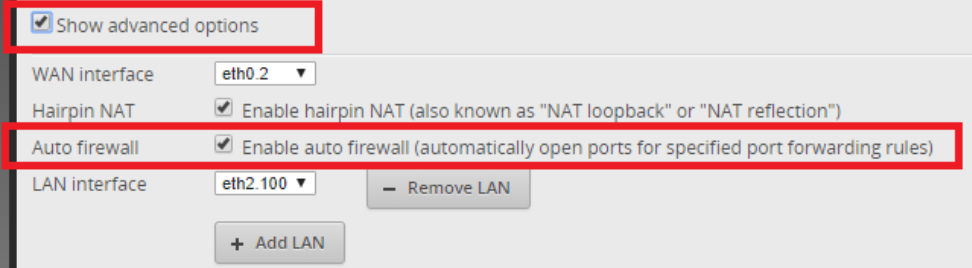
I found this out after being totally confused how UDP traffic was getting through to OpenVPN server, even with no firewall rules established.
Turns out if you use port forwarding in EdgeRouter, there is a hidden "auto firewall" feature in the advanced options.
https://community.ubnt.com/t5/EdgeRouter/Where-do-Auto-firewall-rules-get-stored/td-p/1199244
WAN_LOCAL firewall rules
- If you use the port forwarding feature, the firewall rules are created automatically (if the auto-firewall option is enabled).
- The WAN_LOCAL rules are for traffic going to the router. This is not traffic coming in. That is WAN_IN.
- Notes about Port Forwarding, NAT/Hairpin NAT:
- https://help.ubnt.com/hc/en-us/articles/217367937-EdgeMAX-PortForward
- https://help.ubnt.com/hc/en-us/articles/204952134-EdgeMAX-NAT-Hairpin-Nat-Inside-to-Inside-Loopback-Reflection-
- https://wiki.mikrotik.com/wiki/Hairpin_NAT
- https://community.ui.com/questions/Laymans-firewall-explanation/2dafa379-3269-4749-b224-0dee15374de9
- Notes on firewall rules:
Dynamic DNS
To use dynamic DNS with Cloudflare, the record must exist in Cloudflare before it gets updated.
You can use the “Force Update” button in the EdgeMax UI to force an update. Go to Services tab, then the DNS tab, then the Force Update button.
Update (5/16/18): Changed to use duckdns.org instead of Cloudflare for dynamic DNS. Cloudflare deprecated version 1 of their API. This was what the EdgeRouter was using apparently, so I switched to Duck DNS. The Cloudflare record just is a CNAME that points to the Duck DNS domain.
See also: https://loganmarchione.com/2017/04/duckdns-on-edgerouter/
Xbox Live
- UPNP2 is enabled, see:
service upnp2 - Example config that enabled an Open NAT type on Xbox One. The nat-pmp must be enabled. Secure-mode can also be left enabled.
kremlin-switch-5a
- TP-Link 5-Port EasySmart
- TL-SG105E (Ver 3.0)
- Serial Number:
2178411003671 - MAC ID:
70:4F:57:89:5C:D2
| Port | Destination | VLAN | PVID |
|---|---|---|---|
| 1 | server | Untagged: 100 | 100 |
| 2 | kremlin-nvr | Untagged: 103 | 103 |
| 3 | Untagged: 100 | 100 | |
| 4 | server-02 | Untagged: 100 | 100 |
| 5 | Trunk | Tagged: 100, 103 | 1 |
Notes:
- (2022-07-03) - Somehow the configuration on this switch was reset to a previous state. I noticed there is a “save config” option in the admin panel. Luckily, I had backed up the most recent config so I was able to restore that. I then went back and chose the “save config” option. Apparently this model doesn’t “save” the config automatically? I did not see this option in the 8-port models. This happened right after an internet outage in the area (at least the AT&T page showed there was one). I don’t know if there was a power flicker or something that caused the switch to reboot.
kremlin-switch-8a
TP-Link 8-Port POE EasySmart
TL-SG108PE(UN) (Ver 2.6)
Serial Number: Y19A020000484
MAC ID: CC:32:E5:59:99:94
| Port | Destination | VLAN | PVID |
|---|---|---|---|
| 1 (POE) | AG-SW-A | Untagged: 103 | 103 |
| 2 (POE) | A-NE-A | Untagged: 103 | 103 |
| 3 (POE) | A-NE-B | Untagged: 103 | 103 |
| 4 (POE) | AG-SE-A | Untagged: 103 | 103 |
| 5 | kremlin-ap * | Untagged: 100, Tagged: 101, 102, 103 | 100 |
| 6 | 1 | ||
| 7 | 1 | ||
| 8 | kremlin-switch-8b Port 1 | Tagged: 100-103 | 1 |
*The AP sends Private Network traffic as untagged, so it will get tagged as VLAN 100.
VLAN Notes:
- Tagged: Outgoing packets on the VLAN remain tagged.
- Untagged: Outgoing packets on the VLAN are untagged.
- Not a member: Switch drops outgoing VLAN packets on this port.
- PVID: The default VLAN applied to incoming, untagged packets.
kremlin-switch-8b
- TP-Link 8-Port Gigabit Unmanaged Pro Switch
- TL-SG108E(UN) (Ver 4.6)
- Serial Number:
Y19B024001371 - MAC ID:
CC:32:E5:D2:11:13
| Port | Destination | VLAN | PVID |
|---|---|---|---|
| 1 | kremlin-switch-8a Port 8 | Tagged: 100-103 | 1 |
| 2 | 1 | ||
| 3 | 2-SW-A | Untagged: 100 | 100 |
| 4 | 2-SW-B | Tagged: 100-103 | 1 |
| 5 | 2-SE-A | Untagged: 100 | 100 |
| 6 | 2-SE-B | Untagged: 100 | 100 |
| 7 | 2-MB-A | Untagged: 100 | 100 |
| 8 | Router (eth2) | Tagged: 100-103 | 1 |
kremlin-ap
Wireless access point.
- UniFi AP-AC-Lite
- MAC Address:
f0:9f:c2:3c:95:11 - Alias:
kremlin-ap - Channel: 1
AT&T Router
The router provided by AT&T is used as a passthrough. It handles the optical network termination/AT&T authentication or whatever. Did not find a way to bypass it like you could with Google Fiber.
- Device Model: ARRIS BGW210-700
- Serial Number:
R91NG8JJ102787 - MAC:
88:96:4e:88:df:61 - Access Code:
&0*3=26*7/ - IP: 192.168.1.254
- Subnet mask: 255.255.255.0
- DHCP
- Settings:
- WiFi Operation: Off
- DHCP: On (Needed for DHCPS-fixed passthrough)
- Packet Filter Off
- No NAT/Gaming rules
- IP Passthrough:
- Allocation mode: Passthrough
- Passthrough mode: DHCPS-fixed
- Passthrough MAC:
f0:9f:c2:19:64:d8(MAC address of router’s eth0 port) - Passthrough DHCP Lease: 10 minutes